Affont 1.1.9: the Font preview in Glyph, fixes for Windows, tight fonts in Space & kern, and batches from Affinity
 Emmanuel from AffontTeamTeam·
A quick update with fixes for what you reported after 1.1.8, and one of your ideas. Thank you for writing! What’s new:
The Font preview, now also in Glyph
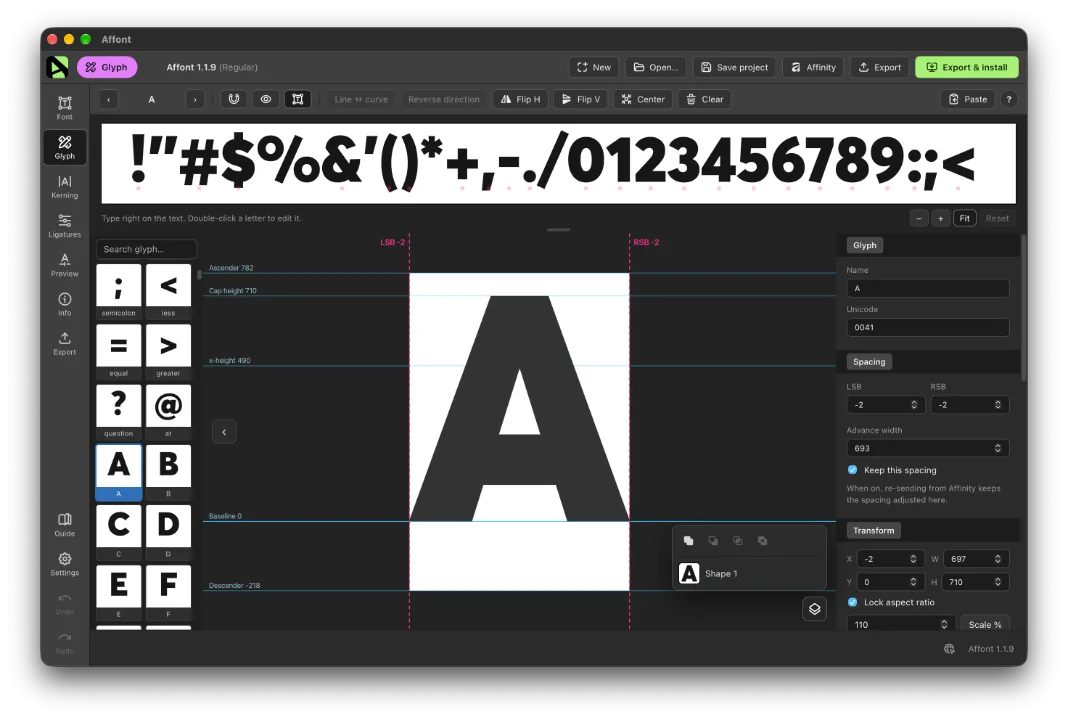
- The strip where you type to try your font in Font can now show in Glyph too, right above the editor, with the same text. Turn it on with the new Test text button (next to the magnet) and it slides open. You see the letter next to the others while you draw it, and it changes as you edit. The letter you’re editing is highlighted.
- Double-click a letter in the strip to edit it, in Font and in Glyph. A letter with alternates shows them first, as before.
- In Glyph, zoom the strip with − and + (or Ctrl/⌘ + wheel, or a pinch), and Fit brings it back; Reset puts it back the way it started. On both screens, drag the strip’s bottom edge to make it taller or shorter.
Windows: no more “os error 32”
Exporting and installing could fail with “os error 32” (the file in use), even after restarting. It happened after undoing back past the last install, or after opening a copy saved earlier. Affont now never copies over a font Windows is using, so it installs every time.
If an app still shows an older version of your font, remove the old copy in Settings ▸ Personalization ▸ Fonts and install again from Affont.
Space & kern with very tight fonts
- A tight font, with letters that overlap, is no longer taken for a joined script. Before, Space & kern only spaced the figures and signs and left the letters as they were.
- If Affont thinks your letters join, the panel now says so with Joined script: leave the letters as they are. Uncheck it to space and kern them too.
- If your n overlaps the letters next to it, the starting air comes from the x-height, instead of saying there is no n yet.
- With Replace the existing kerning unchecked, the panel tells you how many pairs already in the font stay as they were.
Batches from Affinity
- A batch with no reference letters (only ligatures, alternates or accented letters, from a document that hasn’t sent letters yet) comes out at the size of the letters already in your font: the “fi” like the f and the i.
- In All in order, punctuation typed together with a comma in between (“.,;”) keeps the comma when there is one empty shape per character.
No need to import the Affinity scripts again for this version.
Thanks to the designers who reported these bugs and sent their ideas this week, including the Font preview in Glyph, asked for right here in the community. Keep them coming!