1
See Text Preview when editing a glyph and other suggestions

Hi there,
I'd love to share some suggestions, thank you so much for being so responsive to the community!
- I'd love to be able to see the typable text preview when editing a glyph so that I can easily see how it looks next to other glyphs. It would save me tons of time switching back and forth the "Font" and the "Glyph" menu.
Something roughly like this:
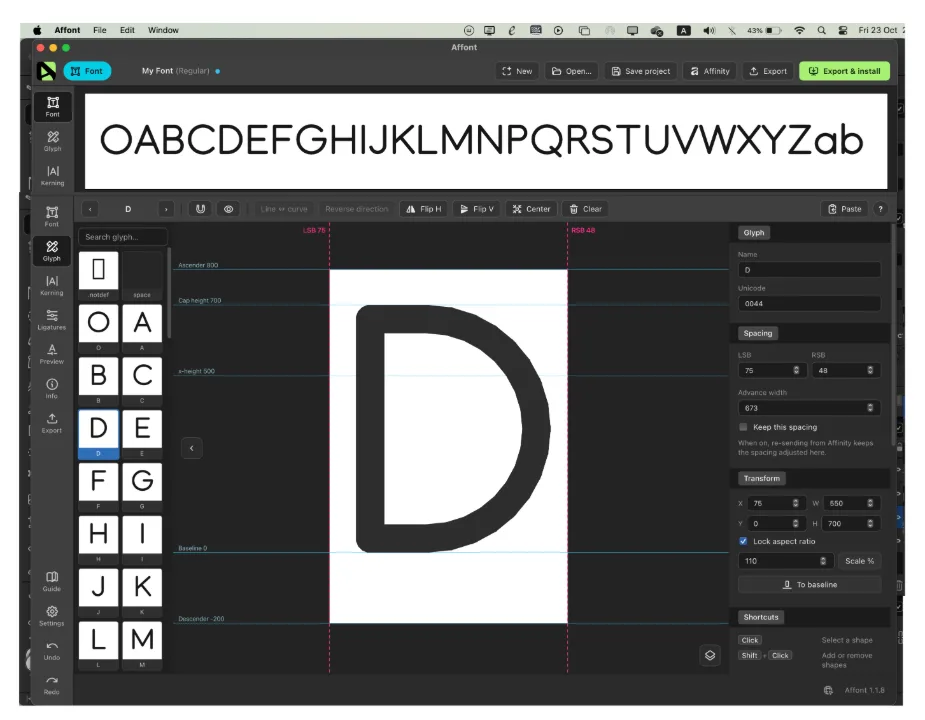
2. Double click on a glyph (from the typable text preview) to edit that glyph would be really convenience too. Currently there's one extra step of clicking on the "Adjust Glyph" button.
3. It would be wonderful if I can Zoom in + out and Panning the typable text preview, along with being able to adjust the height of that text preview box.
I'm still getting used to using Affont. Can't wait to make many many fonts with it!
Thank you again for this great app!